Reviews disappear. No email, no warning, no note in your dashboard. One day the count says 47, a few months later it says 42, and unless you were watching, you will never know which five went missing or when.
That happened to us. We keep dated screenshots of our own Google reviews every month, so we could name all five, say when each one was live, and say when each one vanished. Then we filed with Google.
This is the whole process, screen by screen, shot while filing a real case on our own Business Profile. The form is not hard. Finding it is the hard part, and what you put in it decides whether anybody at Google actually looks.
Before you start
You need proof. Google is not going to take "I think I had more reviews." Get the reviewer names, roughly when each review was posted, and the window when it disappeared. A dated screenshot of the review sitting live on your profile is the strongest thing you can hold.
If you have never archived your reviews, start today. You cannot document a loss you never recorded.
Find the form
Go to the Google Business Profile Help Center and open Contact us. You have to be signed in with the Google account that manages the profile.
Step one asks two things: which business, and what is wrong in one sentence.
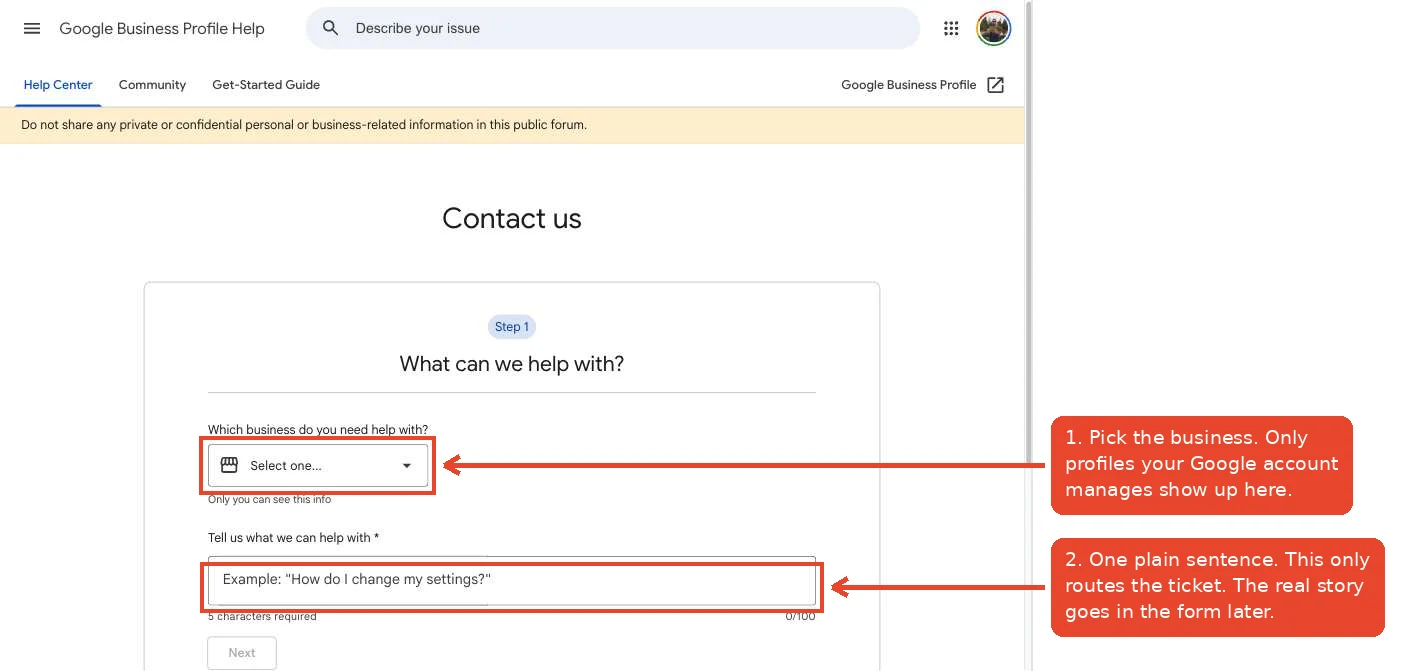
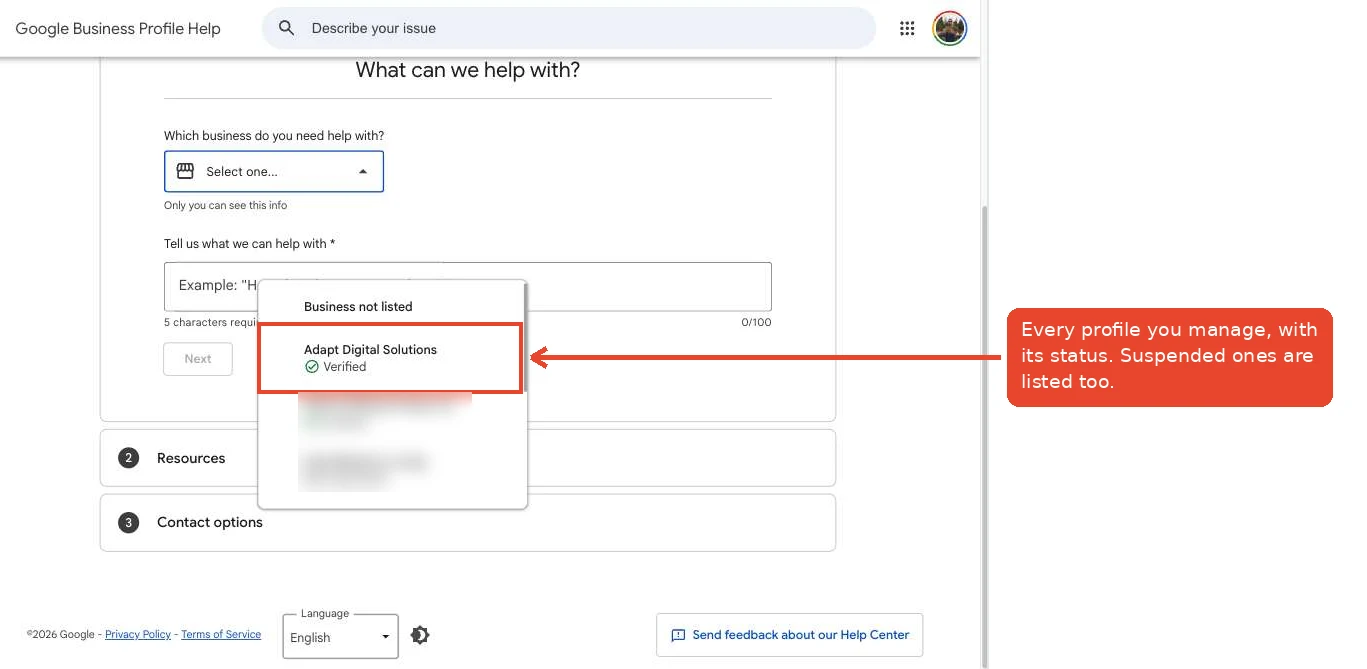
The dropdown lists every profile your account manages. Suspended ones show up too, which is useful information all by itself.
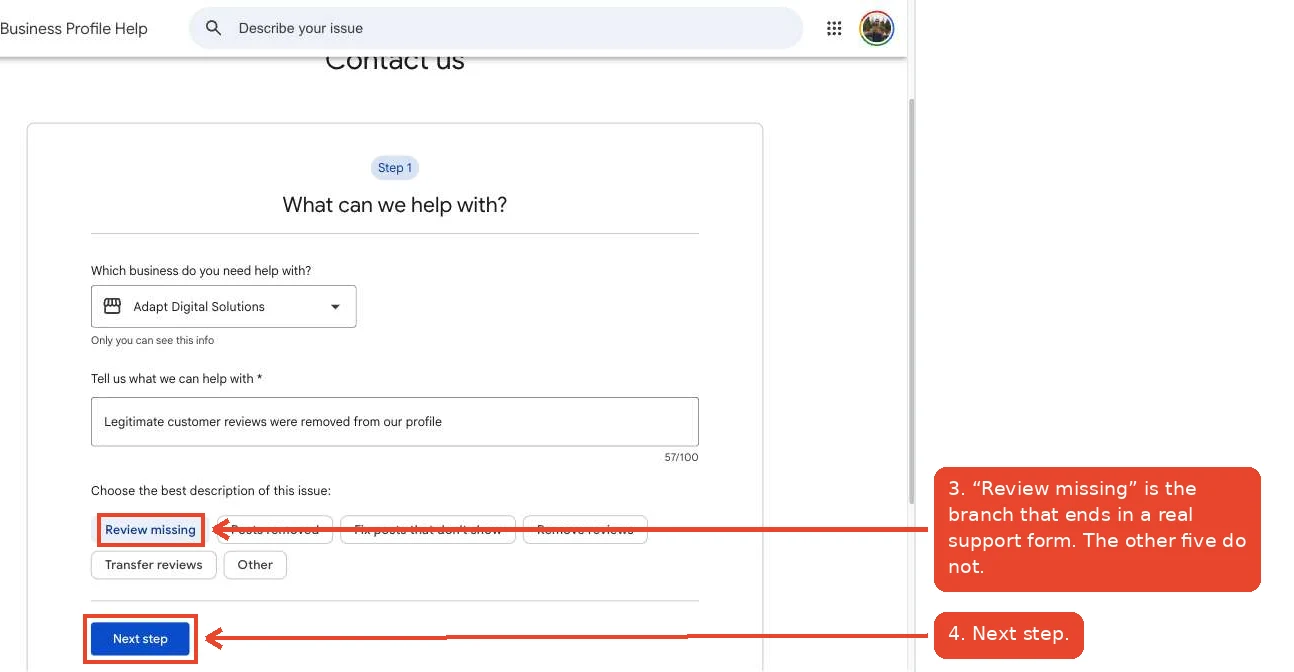
Pick "Review missing" and nothing else
Once you type your sentence, Google offers six categories. Only one of them leads to a real support form for this problem.
Pick Review missing. "Remove reviews" is for getting rid of a review you do not want. "Transfer reviews" is for moving reviews between listings. Choose either of those by mistake and you land in a flow that cannot help you.
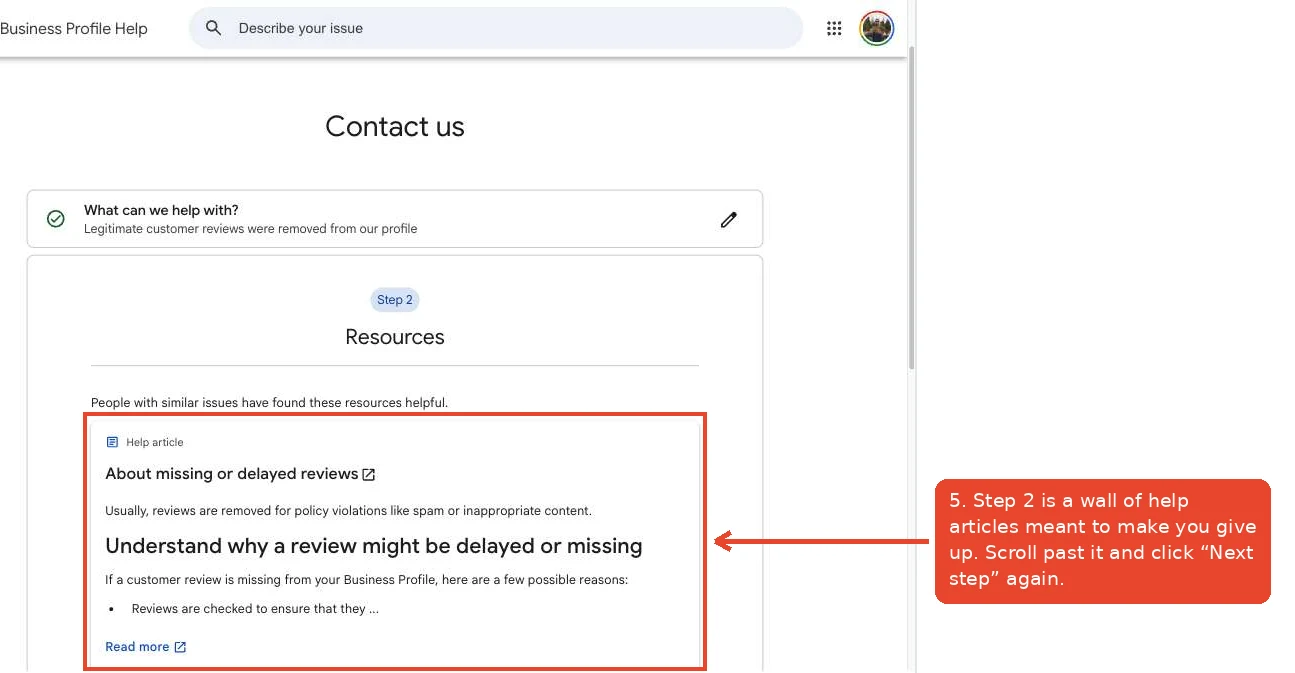
Get past the help articles
Step two of the wizard is a stack of help articles. It is there to talk you out of filing. Read them if you like, then scroll to the bottom and click Next step again.
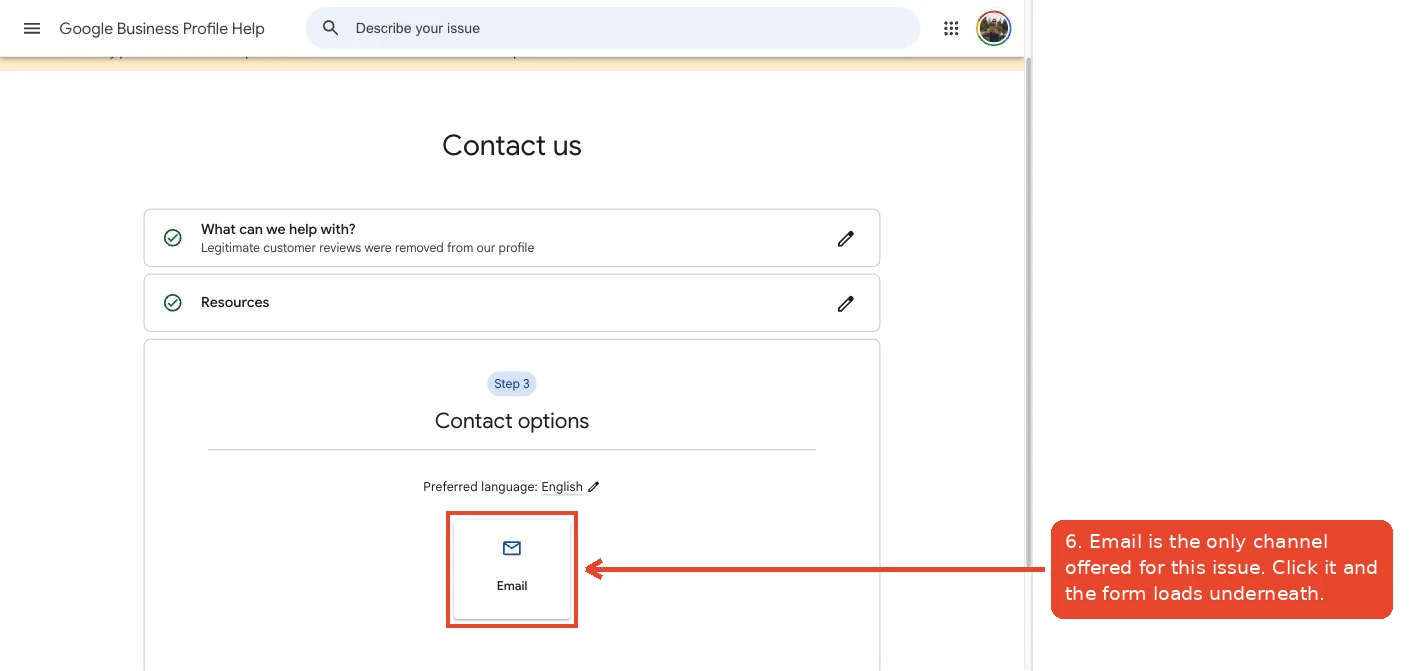
Step three offers your contact options. For missing reviews there is exactly one: Email.
The form, field by field
One thing worth knowing before you start typing: if you have filed about this before, Google sometimes shows a panel beside the form offering to prefill fields from your past cases. It does not appear every time. When it does, use it.
Now the fields. The top block is who you are.
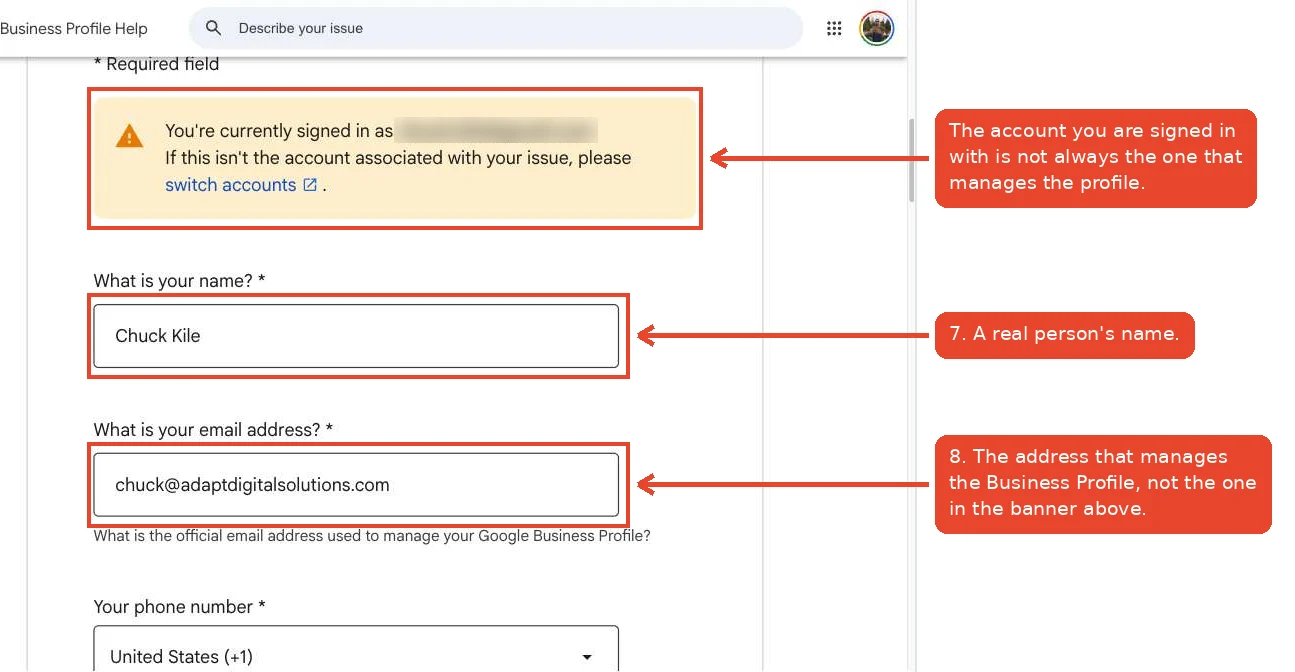
That email trap catches people. You might be signed in to Google with a personal Gmail while the profile is actually run from a company address. The form asks for the address that manages the profile. Put that one in, not the one in the banner.
Next block is the business itself.
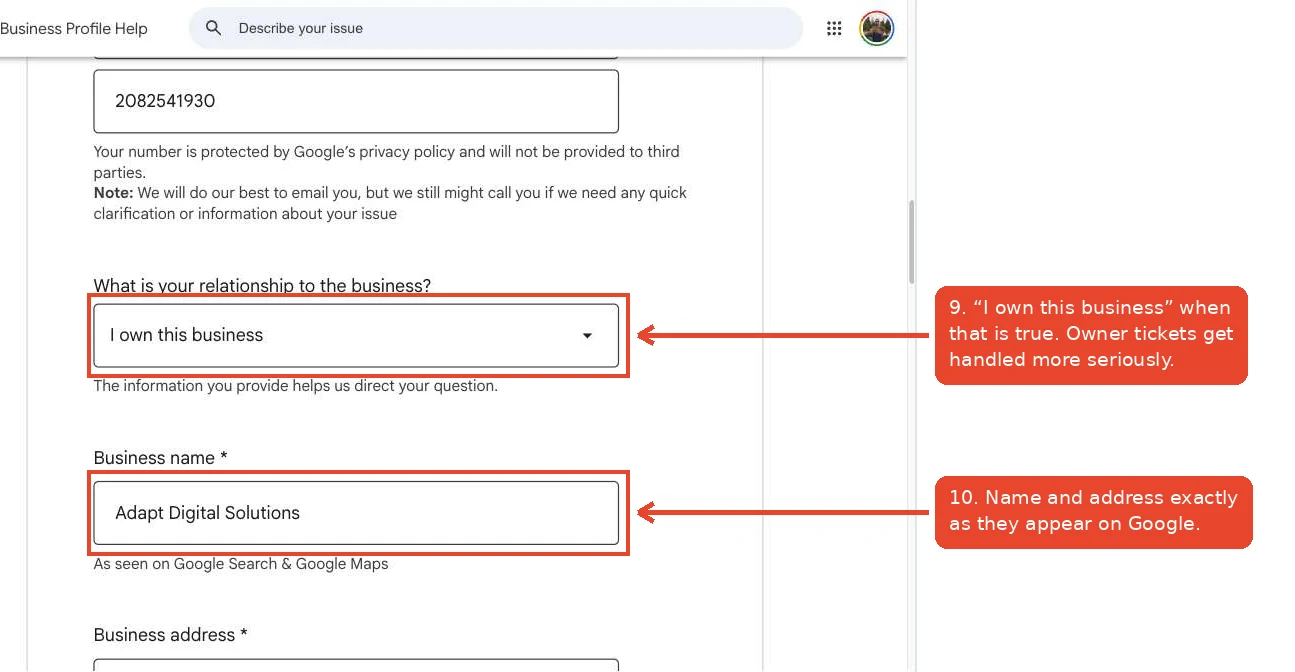
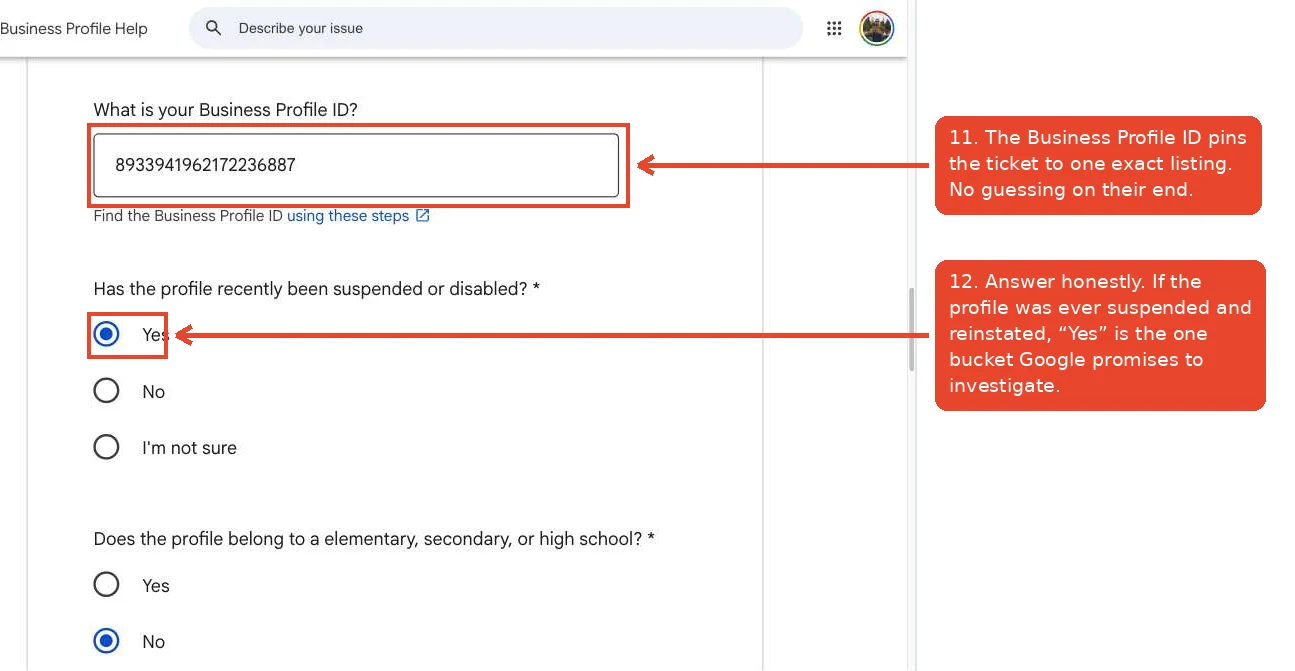
The Business Profile ID is the long number that identifies your exact listing. Google gives you a link right there showing how to find it. Fill it in. It removes any doubt about which listing you mean, and it saves a round trip where an agent asks you to confirm.
Then there is the suspension question, and this is the one worth being careful about.
The suspension question is not a trap, it is a door
If your profile was ever suspended and then reinstated, say so. Reviews going missing after a reinstatement is one of the situations Google openly says it will investigate. Answering "no" out of embarrassment closes the one door that was already open to you.
We answered "no" the first time because our suspension was back in 2025 and did not feel recent. That was a mistake. We corrected it in the follow up.
The last block is the actual case.
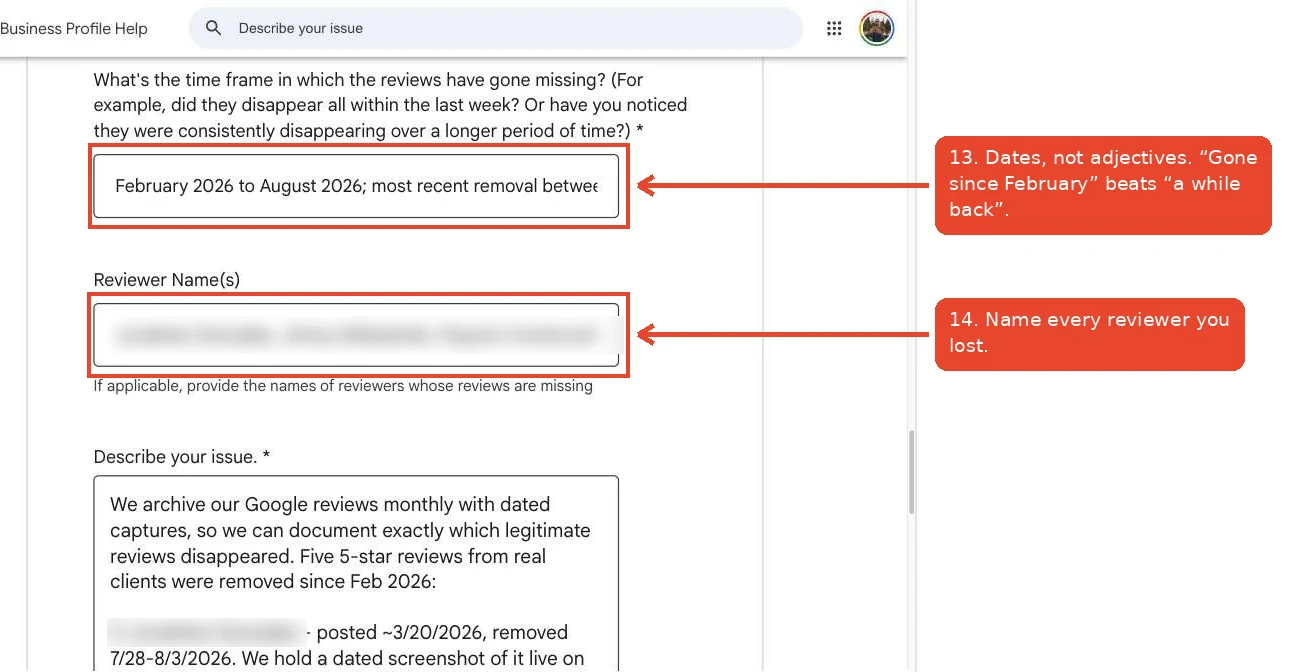
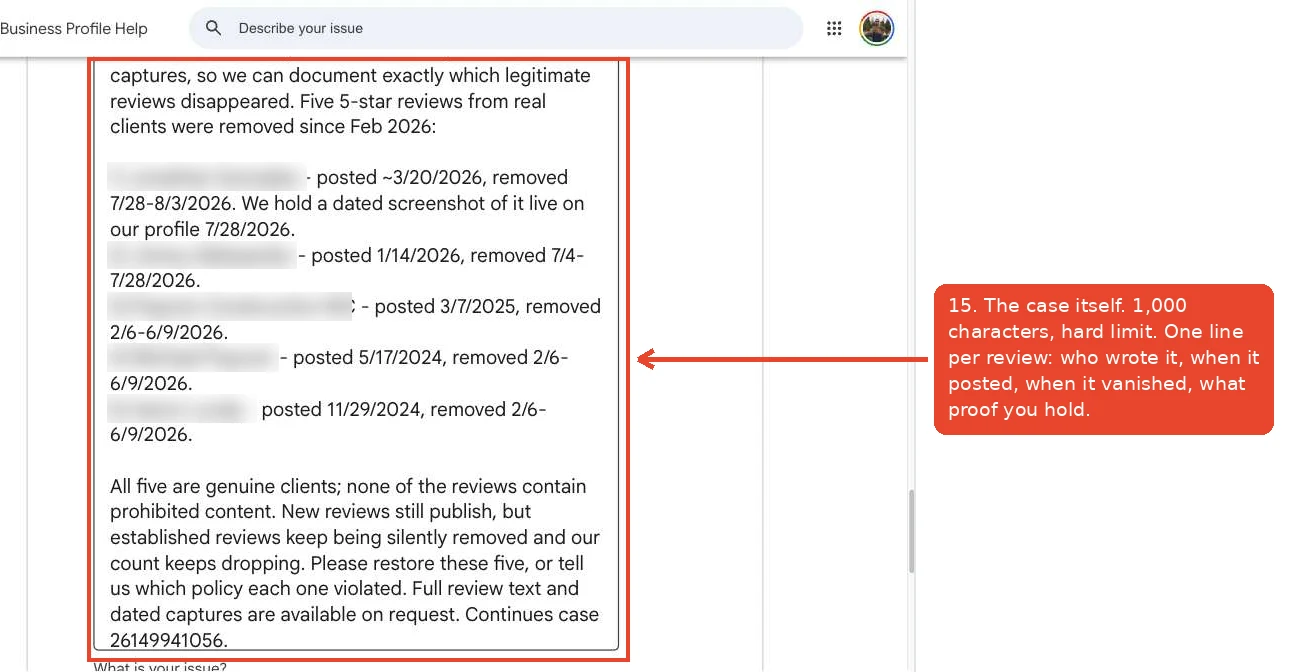
The description box has a hard limit of 1,000 characters. That is short. It is about one paragraph and five short lines, so every sentence has to carry weight.
Here is what we sent, and it fits with room to spare:
Notice what is not in there. No frustration, no story about how much the reviews meant to us, no adjectives. Just names, dates, and a specific request. That last sentence does real work: asking them to name the policy forces a specific answer instead of another form letter.
Finally, the case ID field and the Submit button.
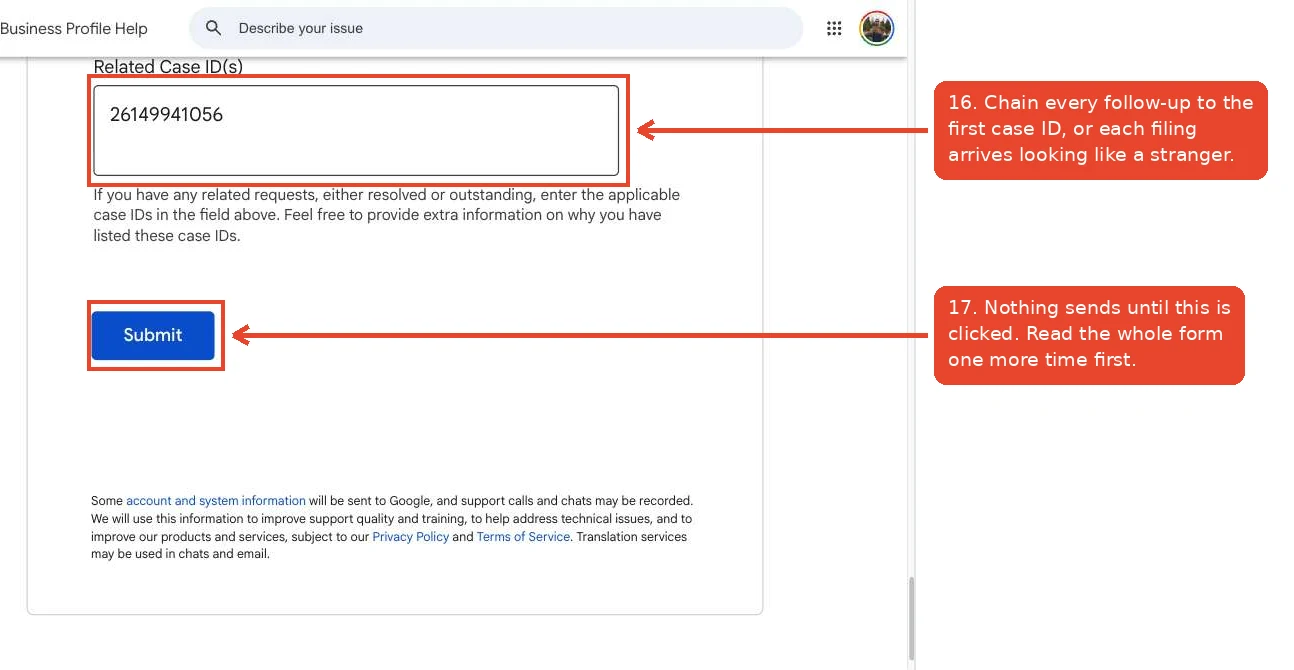
If you have filed about this before, put the old case ID in Related Case IDs. Every filing without it arrives looking like a brand new stranger with a brand new complaint. With it, you are one business with an ongoing problem, which is much harder to close and forget.
What happens after you hit Submit
You get an automated email almost immediately. Ours listed three guesses: a sync delay between Search and Maps, a profile that was suspended and reinstated, or reviews that broke the content policies.
That email is not a person. It is a filter. But it usually ends with an invitation to reply, and replying is how you get a human on it.
So reply in the same thread and knock down the guesses one at a time. Keep it human. Here is the reply we sent, trimmed:
That middle paragraph came out of looking at which reviews actually went missing. Three of the five mentioned me by name. A spam filter can read a person's name in a review as a sign the review was coached. If that is the pattern in your own losses, say it plainly, because you can explain it and the filter cannot.
The closed ticket problem
Sometimes the reply bounces. We got an email back saying the ticket was closed and replies to a closed ticket are not read.
When that happens there is only one move left: file the form again. Same details, same evidence, and put the old case ID in the Related Case IDs field so the new ticket carries the history.
We refile every two weeks until we get a real answer. That is not stubbornness for its own sake. Cases get routed to different people, and a filing that lands on a human who actually looks is the whole game.
What Google will and will not do
Be honest with yourself about the odds.
Google will fix its own mistakes. Reviews caught by a filter that should not have caught them, reviews lost after a reinstatement, reviews missing because of a bug: those get restored, and people do get them back.
Google will not undo a policy removal. If a review broke the rules on their side, it is gone, and no amount of filing changes that. Nobody can promise you a restoration, and anyone selling you one is selling something they cannot deliver. If you are not sure which side of that line your reviews fall on, our 2026 Google review policy guide walks through what is actually banned and what is a myth.
What you control is the quality of the case you file. A ticket with names, dates, a Profile ID, and dated screenshots gets treated differently than one that says "some of my reviews are missing."
The part nobody does
Everything above rests on one thing: we knew which reviews were gone.
Most businesses do not. They notice the count dropped and cannot name a single review they lost, so their filing is a shrug in writing and it gets closed as such.
So archive your reviews. Screenshot your profile every month, or run something that does it for you, and keep the files with dates on them. It takes ten minutes a month and it is the only reason we could write those five lines with confidence. While you are at it, the best defense against losing reviews is having more of them, which is its own habit: how to get a Google review from every single job.
The checklist
- Archive your reviews monthly. Dated screenshots of your profile, saved somewhere you can find them.
- Check the count every month. When it drops, compare against last month's capture and name exactly which reviews are gone.
- File within a week of noticing. Help Center, Contact us, pick the business, "Review missing", then Email.
- Fill the form with facts. Profile ID, honest suspension answer, reviewer names, posted date and removal window for each one, all inside 1,000 characters.
- Reply to the auto-response and knock down each guess with your dates.
- If the ticket is closed, refile every two weeks with the old case ID in Related Case IDs, until somebody answers you specifically.
We do this for our clients every month, and we did it for ourselves the same week we wrote this. If you would rather somebody just watched your reviews and filed when they go missing, tell us about your business and we will show you what we track.